
 2026–Ongoing
 Custom Addresses
Detailed address and location entry for jobs that Google autocomplete can't find. Used a sacred-data model that protects user input from being overridden. First AI-created prototype at Roofr, then partnered with a BE dev to bring it into the real codebase.
Case highlights
40%
Pain validated
of surveyed users; #1 address entry issue at 55.8% (of that 40%)
Revenue protected
Bigger release approved
complete map + pin instead of a text-only solution that would have risked the report funnel
First at Roofr
AI-created prototype
Figma → HTML/CSS/JS → real codebase
- Friction at scale. 40% of surveyed users hit address issues; 55.8% cite “address doesn’t show up” as the #1 complaint.
- Direct revenue risk. Reports require coordinates. A text-only fallback would create jobs that can’t order reports.
- Data integrity. Contractors used fake addresses to work around the limit, corrupting downstream metrics.
- Sales objection. “We can’t adopt Roofr until we can enter new-construction addresses.”
Launch
Unblock and protect
- 01 Unblock new-construction and rural jobs.
- 02 Capture exact coordinates for the measurement team.
- 03 Roll out via staged internal beta to GA.
Strategy
Protect revenue, set up platform
- 01 Protect the report-revenue mechanic across rollout.
- 02 Unblock multi-address support next.
- 03 Make AI-native design the team standard.
The project ran as a progression of artifacts.
- Static Figma + PRD with Claude. Layout was right; interaction questions stayed open.
- HTML/CSS/JS prototype with Claude Code. Leaflet, Nominatim, glass form panel, floating and anchored pin states. First AI-created prototype at Roofr.
- Real-codebase build, BE-dev partnered. Walked C-suite, VP Engineering, and CRM PM Lead through it.
- Design-team onboarding. The Claude Code workflow became the team standard.
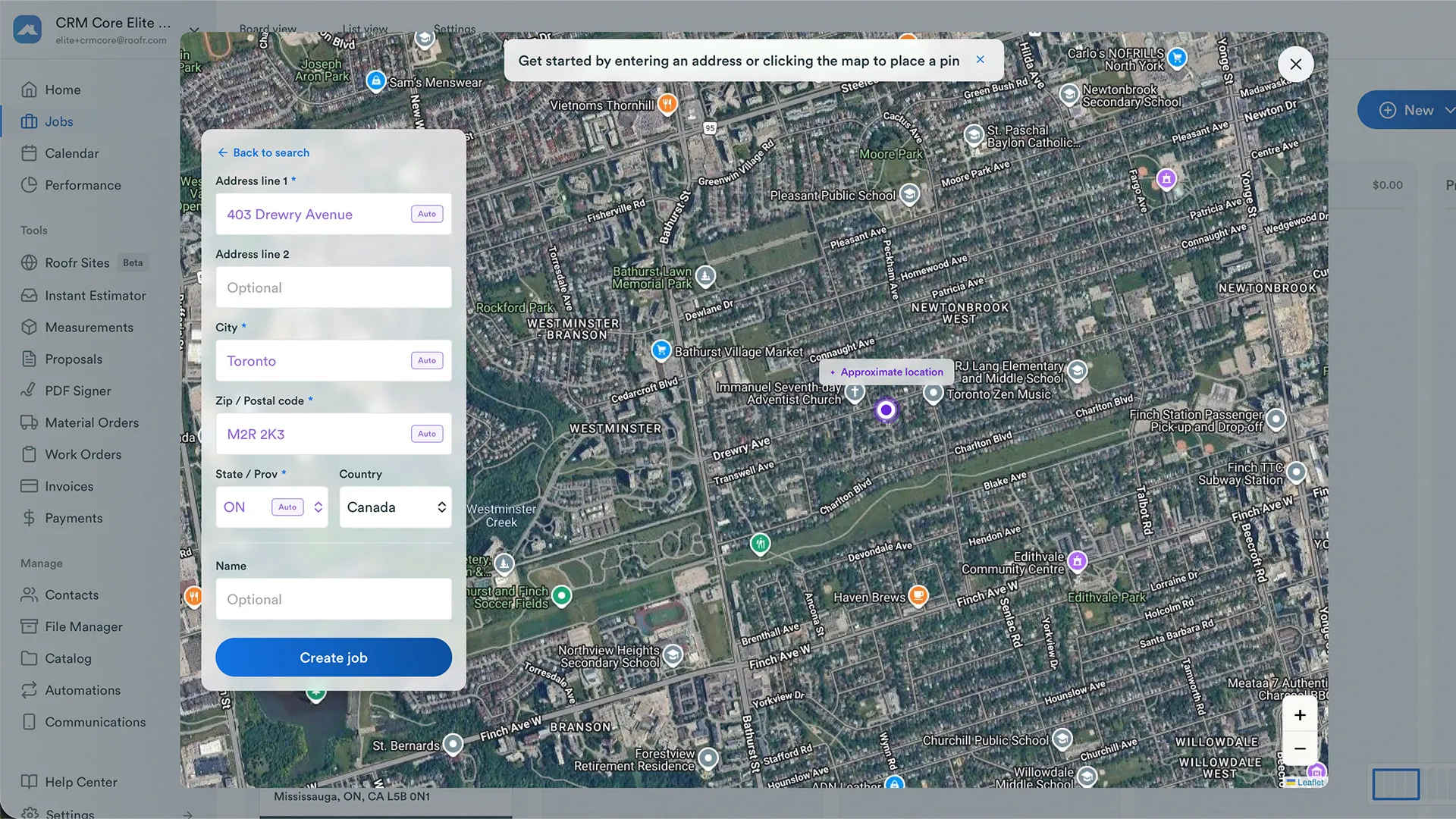
Built in Claude Code as the sales-tool prototype. Autocomplete + manual fallback, glass form panel, floating + drag-to-anchor pin, reverse-geocode backfill, JSON output.
REEL Prototype walkthrough
Full prototype walkthrough. Autocomplete to manual fallback to anchored pin to output JSON.
Sacred-data. Any user input (typed or pinned) is locked once entered. System guesses render purple with an “Auto” badge; user-confirmed values render in normal text. The pin mirrors the fields: floating purple dot is the system’s guess, anchored blue teardrop is user-placed and immovable until released.
Same interaction rebuilt inside Roofr’s real codebase. BE dev built the backend; I did the FE styling.
REEL Real-codebase walkthrough
Full walkthrough of the real-codebase build. Same flow, inside Roofr proper.
Three pieces of the sacred-data contract from the real-codebase env, plus the mobile build.
Auto-fill state system. Empty to suggested (purple text + Auto badge) to locked (normal text, no badge) once a user edits.
Pin states. Floating (purple dot, follows form input via debounced geocode) and anchored (blue teardrop, user-placed, immovable until released).
Status banners across the top of the map: locating, found, not found. Reverse-geocode feedback surfaced inline so the user knows what just happened.
Mobile build. Same flow, same sacred-data contract, native mobile constraints.
Skip V1 by prototyping in code
Built map + pin in Claude Code (faster than an interactive Figma). The working prototype won the argument for the complete release.
Partner on the real codebase
HTML prototype was the sales tool. Real-codebase build was the engineering handoff. BE dev on backend, me on FE styling.
-
40%
Surveyed users hit the pain
Top three: 'address doesn't show up' (55.8%), new construction (27.9%), units / suites (20.9%).
-
Revenue protected
Bigger release approved
C-suite, VP Engineering, and CRM PM Lead chose the complete release over a text-only interim that would have broken the report funnel.
-
First at Roofr
AI-created prototype-in-codebase
Built in Claude Code, rebuilt in the real codebase with a BE-dev partner.
-
All 10 designers
AI workflow rolled out
Same Claude Code practice, now the in-house reference for AI-native design at Roofr.
KPIs instrumented from rollout day one. Defined before launch so success criteria don’t get reverse-engineered to whatever the data shows.
- Feature adoption. Share of jobs created via the custom-address flow vs the Google autocomplete path.
- User unblock rate. Users who type 4+ chars, get no Google match, switch to manual, and complete job creation.
- Sales unblocked. New deals closed because Roofr now supports new-construction addresses.
- Operational savings. Reduction in “Address Not Found” support tickets.
- Unblocked revenue. Volume and dollar value of proposals, reports, and invoices on jobs created via the custom-address feature flag.
- Figma isn’t always enough. When the interaction questions are the design, move to code.
- Sacred-data is a contract. Purple plus the “Auto” badge is portable to any auto-fill surface in the product.
- AI workflow ≠ AI output. The model didn’t choose sacred-data, V1-skip, or the BE partnership. It accelerated PRD drafting and interaction-to-code translation.
In build. Q3 2026 rollout. KPIs land post-launch.
Deep dive
Curious about the specifics?
Adoption cohorts, revenue pivot data, prototype walkthrough videos, and the internal PRD are available on request during a portfolio review.