
 2024
2024 Custom Workflows
Turned a single static pipeline into three customizable workflows, so roofers can model insurance, residential, and repair jobs the way they actually operate.
Case highlights
3,070
Custom stages created
across the customer base, 1 year post-launch
37%
Elite users on all 3 workflows
another 25% on 2 workflows; rest on 1
99%
Coverage by 3-workflow cap
~30 customers requested a 4th; backend supports unlimited
- The single MVP pipeline cut out entire customer segments. Insurance and repair contractors were stuck.
- Stages weren’t customizable. Contractors wanted basic functionality like custom naming.
- Customers running mixed operations (60% residential, 40% insurance) were forced into one lifecycle for both.
- Customer demand was undeniable. Customization was the second-loudest product request after the CRM itself.
Launch
Adoption signals
- 01 Adoption of more than 1 workflow per company.
- 02 Customization of stages.
- 03 Customer feedback confirms the segment gap closed.
Strategy
Operating-system claim
- 01 Insurance + repair segments unblocked.
- 02 Elite-tier upgrade lever.
- 03 Architecture leaves room to unlock more workflows later.
- Can’t break existing jobs. Old behavior unchanged, new customization opt-in.
- “Customers want a blank workflow builder” was the hypothesis to disprove. Interviews killed it fast. Most contractors wanted tweaks (rename, add “Follow Up”, delete an unused stage).
- Competitor teardown (JobNimbus, AccuLynx) confirmed the trap: deep customization, rarely used. UI added complexity contractors didn’t want.
- Most customers run two or three processes that share most stages, with a handful of segment-specific ones (Claim Filed, Adjuster Meeting). The shared-stage pool followed from that pattern.
Single static pipeline, on/off list of stages. Worked for residential, frustrated everyone else.
Two ideas surfaced early: starter templates instead of a blank canvas and a shared stage pool so a stage named once could appear in multiple workflows without a confusing data model.
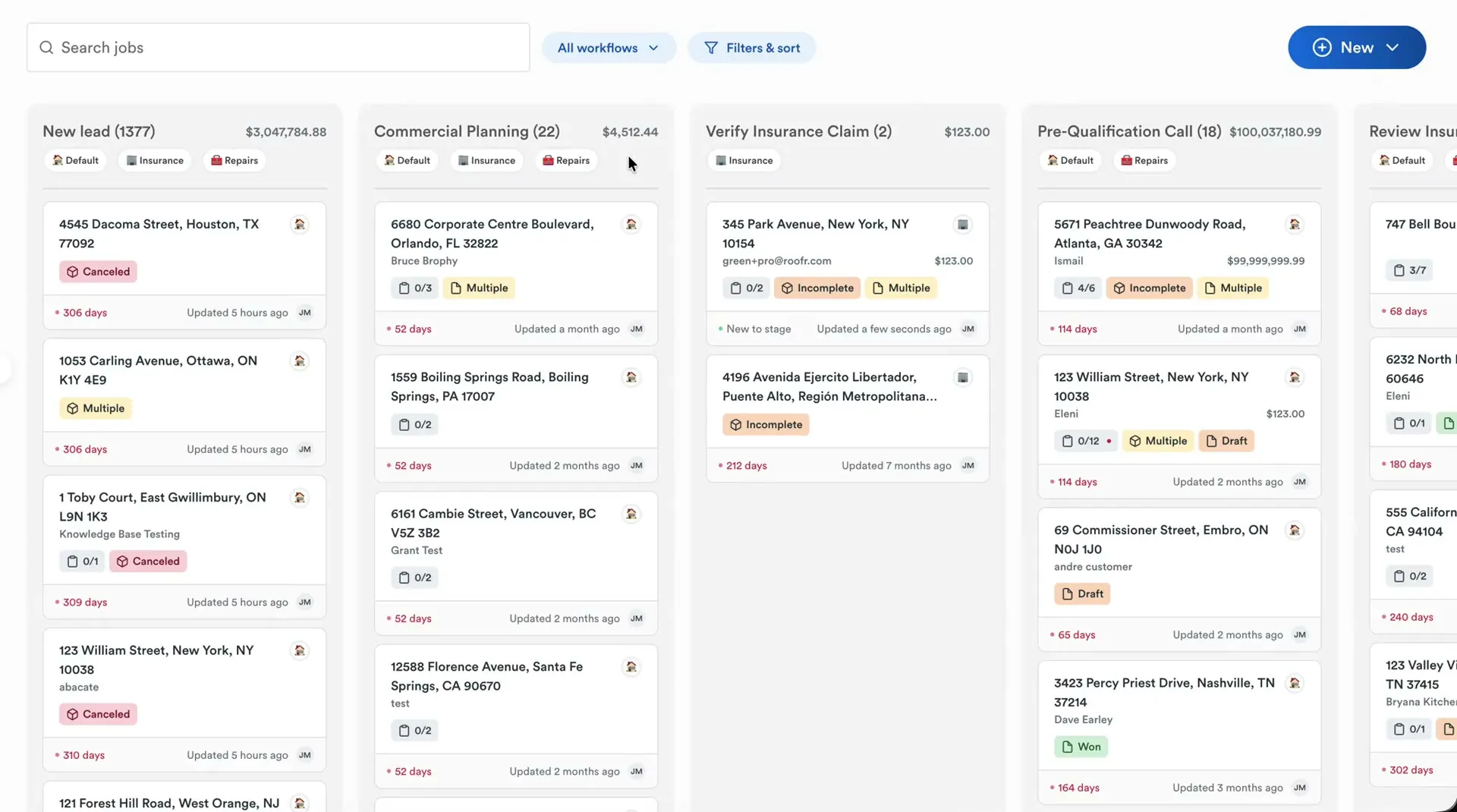
Settings surface and the multi-workflow Board View, both shipped to Elite. Hard cap of 3 workflows; backend supports unlimited.
Workflow management. Up to 3 workflows, Manage per row, cap-reached state at 3.
Stage editor inside a workflow. Drag-reorder, add-from-pool, rename, disable.
REEL Multi-workflow Board View
All workflows by default. Workflow chips on every card, optional single-workflow filter. The unified board is what makes customization feel like a platform capability, not a settings page feature.
Shared stage pool
Stages live at the company level and are referenced by workflows.
Suggested workflows
Three pre-built workflows instead of a blank builder. Customers start from a template and tweak.
Soft cap of 3 workflows
Backend supports unlimited; UI caps at 3 to cover most customers without bloating the surface. ~30 requests for a 4th post-launch.
-
3,000+
Custom stages created
1 year post-launch. Top adds: Scheduled, Claim Filed, Adjuster Meeting, Approved, Prospect, Follow Up, Gutters. Mostly insurance and repair vocabulary, exactly the case customization was scoped for.
-
37%
Elite users on all 3 workflows
Another ~25% on 2 workflows and the rest stayed on 1.
-
99%
Coverage by 3-workflow cap
~30 customers requested a 4th. Backend supports unlimited; the cap is a product decision driven by settings-surface usability, not a technical constraint.
-
Proposal Signed
Most-renamed shared stage
Once renamed on one workflow, the shared-stage architecture propagated across all three.
-
Operating system
Positioning made real
Insurance and repair now have a working lifecycle inside Roofr.
Tier-gate caveat. Adoption is measured against the Elite-tier population, the only tier with workflow-customization access.
Deep dive
Curious about the specifics?
Adoption cohorts, revenue pivot data, prototype walkthrough videos, and the internal PRD are available on request during a portfolio review.